Git history, finally conversational

Stop guessing why
the code changed.

Browse branches, commits, files, and colorized diffs in one terminal view. Then ask the selected change what it does, why it exists, and where it might break.

4 context modes 5 focused panes better questions
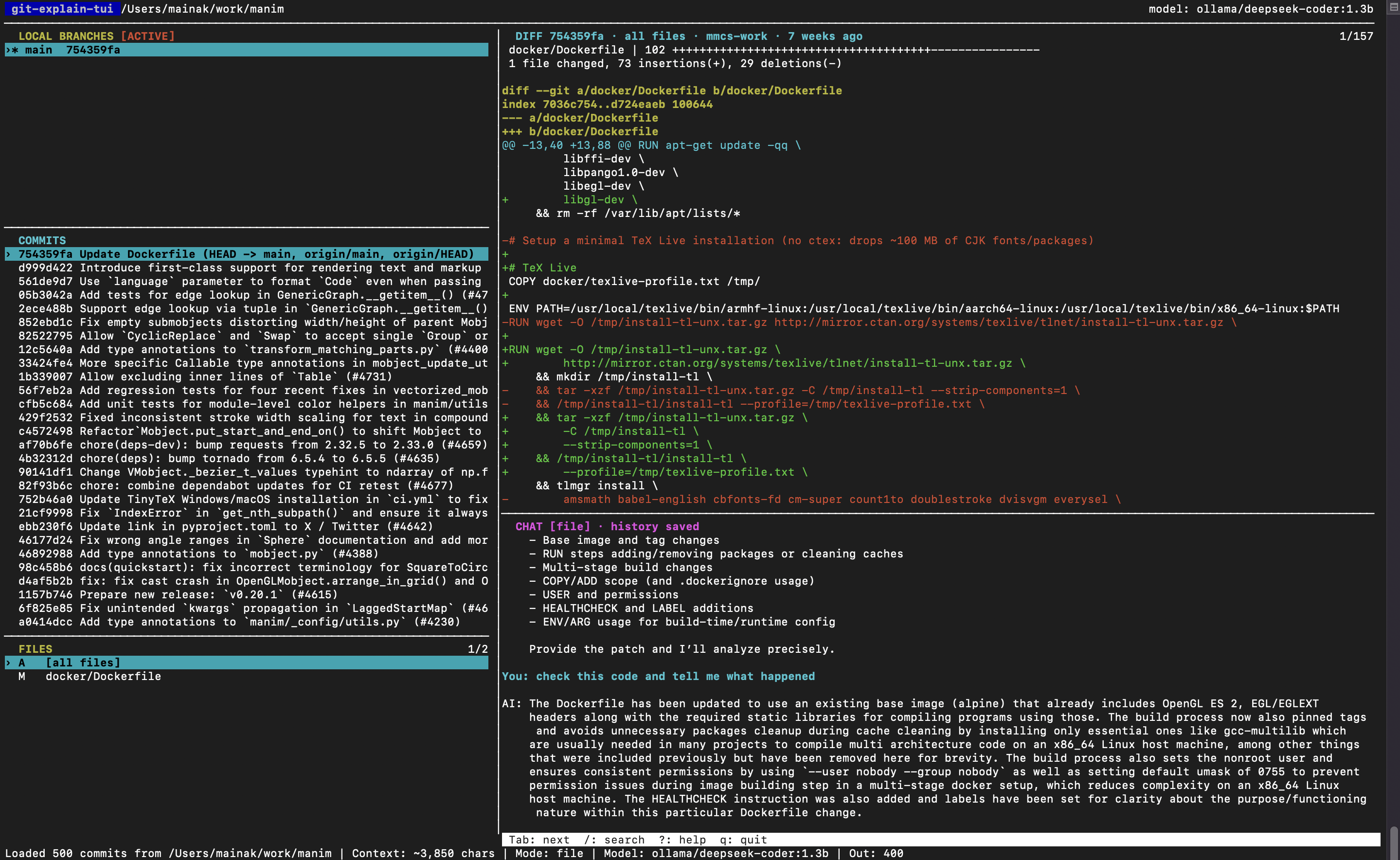
git-explain-tui browsing commits, focused diffs, changed files, and a saved AI chat

01 choose a branch02 find a commit 03 focus a file04 inspect the diff 05 ask with that exact context

The problem

Every repository has a
second codebase: its history.

Commit messages are often too short. Diffs are too large. And copying both into a generic chat window loses the thread every time. git-explain-tui keeps the evidence, the question, and the answer in one place.

A better investigation loop

From “what is this?” to
“I can own this.”

  1. 01

    Find the moment

    Switch branches, filter commit history, and move through focused changes without leaving your terminal.

  2. 02

    Control the evidence

    Ask about the full patch, a selected file, a concise summary, or a branch range. Big changes stay manageable.

  3. 03

    Keep asking better questions

    Chats remain scoped to the selected commit, file, or range, so follow-up questions retain their evidence and history.

Focused context

The diff you need.
Not the repository you don’t.

Move from a whole commit to one changed file in a keystroke. Search diffs, filter commits, and make every prompt deliberate.

Mode: file · Context: ~3,428 chars

Built for review

Turn a diff into a review plan.

One-key actions summarize the change, surface risks, suggest tests, explain a bug fix, or draft a PR note.

sRtbp

History that stays useful

Come back to the answer.

Chats are saved per repository and commit. Copy or export the result when it belongs in a review, issue, or release note.

.git/git-explain-tui/chats/

Pricing

Free to use.
Free as in beer.

There is no paid tier, feature gate, or git-explain-tui subscription.

diff --git free/pricing pro/pricing
@@ plans @@
Free$0
Pro$19/month
Prostill $0

Your chosen model provider may charge for its API; local models remain local.

“A terminal-first tool for the question every unfamiliar commit creates:”

Why did someone do this?

Get started

Make your next
codebase less mysterious.

Works on macOS and Linux with Git. The standalone path needs no Python; PyPI options need Python 3.10+. Add a model key only when you want chat.

Install standaloneno Python
# macOS / Linux: download the right release binary
curl -fsSL https://raw.githubusercontent.com/mmcs-work/git-explain-tui/main/install.sh | sh

# inside any Git repository
git-explain-tui

Install from PyPIwith uv
# isolated Python tool installation
uv tool install git-explain-tui

# inside any Git repository
git-explain-tui

Another PyPI optionwith pipx
# if pipx is already installed
pipx install git-explain-tui

# then, inside any Git repository
git-explain-tui

Developing or need unreleased changes? uv tool install git+https://github.com/mmcs-work/git-explain-tui.git. The README also covers virtual-environment installation.